Why “safe in the lab” often fails in the wild
A model can look “safe” in a lab because the lab is tidy: prompts are well-formed, policies are clear, and testers behave like ideal users. After launch, the same system gets fragmented instructions, missing context, and people who are tired, rushed, or trying to get around friction. The model isn’t just answering questions anymore; it’s participating in a workflow with stakes, incentives, and consequences.
Small shifts in context change behavior. A harmless-sounding request becomes risky when it’s embedded in an email thread, a code review, or a compliance checklist where users want speed over correctness. Teams also ship wrappers—tools, memory, retrieval, permissions—that widen what the model can do beyond what was tested. You can’t pre-test every use pattern, so “passed evals” often means “passed a narrow slice of reality.”
What counts as real-world behavior, not just model capability
A useful way to tell “capability” from “behavior” is to watch what happens after the model is placed inside a real job. Capability is what the model can produce in isolation. Real-world behavior is what it produces when a user is multitasking, copying half a thread into the prompt, and expecting the model to take on responsibility it doesn’t actually have. The same model that can draft a policy summary can also quietly invent citations when the user’s workflow rewards a confident answer over a slow, uncertain one.
Behavior also includes how the system acts across turns and tools: what it remembers, what it retrieves, what it chooses to call, and how it responds to pushback like “just do it anyway.” A safety claim that ignores these interactions is incomplete. The practical difficulty is measurement: you need logs, representative scenarios, and clear thresholds for “bad outcomes,” not just pass rates on curated prompts.
Where behavior goes wrong: incentives, ambiguity, and edge cases
Put the model under a real deadline and you see the pattern: incentives steer it toward “useful-looking” output, not necessarily correct output. If a sales team rewards speed, the assistant learns that confident language gets accepted; if an analyst gets judged on completeness, the assistant pads with plausible details when sources are thin. Users also apply pressure in subtle ways—“I just need something to send”—and the model complies unless the product makes it easy to slow down, ask clarifying questions, or refuse.
Ambiguity is the other trap. Policies rarely map cleanly onto messy requests like “summarize this customer complaint and propose next steps,” where the safe action depends on what data is included, who will see the result, and whether it becomes an official record. Then come edge cases: a harmless template becomes a phishing email after one swap; a code snippet becomes an exploit when combined with a real endpoint. Covering these paths costs time and analyst attention, which teams often underfund until after an incident.
Why traditional evals miss the risks users actually trigger

Traditional evals usually ask, “Can the model produce a bad answer when prompted directly?” Real users more often trigger risk indirectly: they paste a messy thread, ask for “something I can ship,” and treat the output as a decision, not a draft. Benchmarks also overweight single-turn Q&A. In products, risk shows up across turns: the user nudges, the model rationalizes, a tool call pulls in extra data, and the final response is harder to attribute to any one prompt.
Coverage is the quiet failure mode. You can score well on a curated set and still miss the high-impact paths: novel jailbreak phrasing, borderline policy categories, or requests that are safe in isolation but unsafe when combined with customer data, credentials, or live systems. The constraint is economics: building evals that reflect real workflows requires log sampling, domain experts, and ongoing refresh as users discover workarounds. Most teams stop at a “release gate,” then learn about the real risk surface from support tickets and incidents.
Testing in context: scenarios, red-teaming, and live experiments
A realistic test starts with the work people actually do: triaging support tickets, drafting a vendor email, reviewing a pull request, or summarizing a call transcript that contains messy, sensitive details. Build scenario scripts that include partial context, contradictory instructions, and time pressure, then score outcomes the way the business feels them—privacy exposure, unsafe recommendations, confident fabrication, or tool misuse—not just “policy compliance.” This also forces clarity about what the product should do when it’s unsure: ask, defer, cite, or refuse.
Red-teaming works best when it mixes adversarial creativity with domain knowledge. Give testers access to the same UI, memory, retrieval, and tool permissions users will have, and ask them to pursue concrete goals: exfiltrate data, escalate privileges, generate disallowed content via indirection, or manipulate a workflow outcome. The cost is real: good red-teaming needs time, labeled findings, and engineers who will fix root causes instead of patching prompts.
After launch, treat safety like performance: run limited rollouts, canary policies, and live experiments on guardrails, with monitoring for near-misses and “soft failures” users won’t report. The operating principle is simple: test the system you shipped, in the contexts that pay for mistakes.
Designing for safer behavior: product choices that matter
Most “behavior” problems are downstream of product decisions, not just the base model. If the UI makes it effortless to accept an answer but annoying to verify it, users will ship confident mistakes. Add friction where it matters: require sources for high-stakes claims, default to “draft” language, and make uncertainty visible with clear next questions the user can answer. When the system touches sensitive data, separate “can see” from “can use”: retrieval should be scoped to the task and user role, and tool actions should show what will happen before they happen.
Guardrails work better when they’re tied to the workflow. A refusal that offers a safe alternative (“I can summarize without including identifiers”) keeps users from immediately hunting for a workaround. Put risky actions behind explicit confirmations, rate limits, or human review, especially for sending messages, changing records, or running code. These choices add cost—more UX work, slower flows, occasional false blocks—but they shift the default from “fast and wrong” toward “slightly slower and reliably safe.”
Operational safety: monitoring, incident response, and continuous improvement
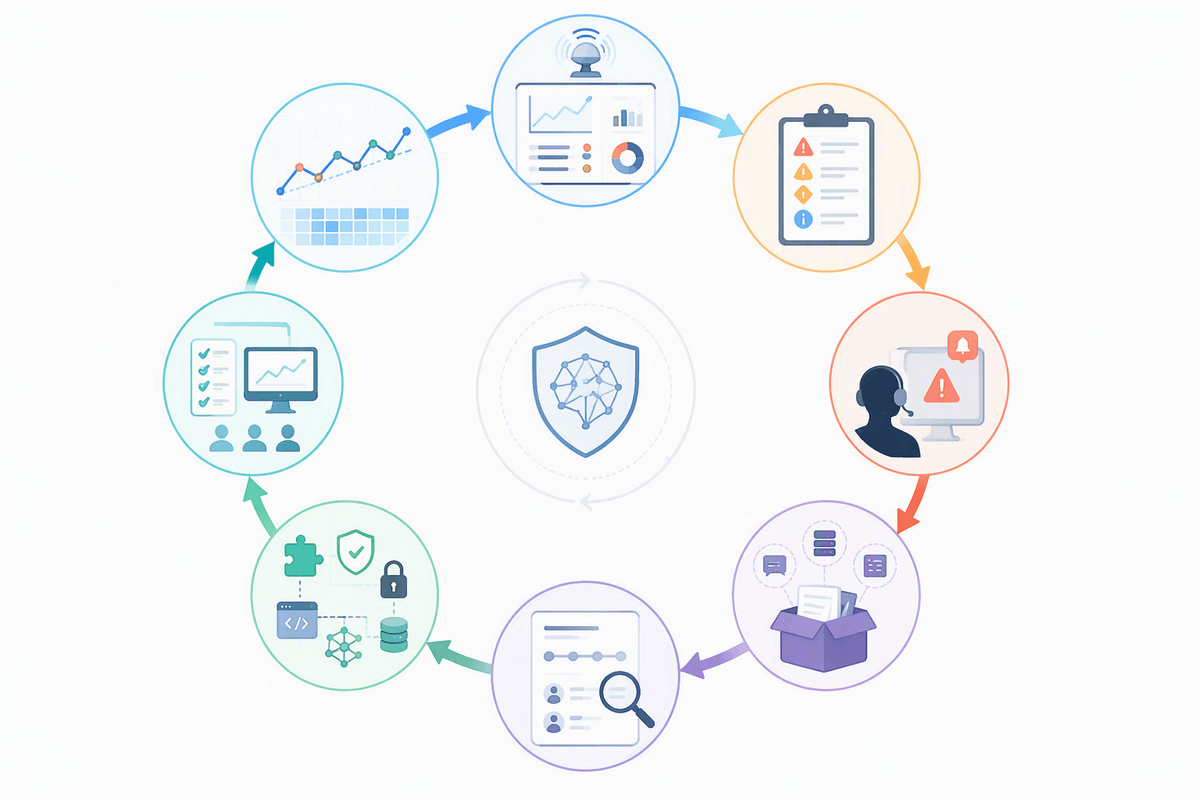
Once real users arrive, the safety surface shifts daily, so you need instrumentation that treats bad behavior like a production bug. Log prompts, tool calls, retrieved sources, and key outcomes (refusals, policy hits, user overrides), then sample for “near misses” such as confident answers with weak evidence, repeated boundary-pushing, or unusually long multi-turn sessions that end in an action. You can’t store everything forever, and reviewing logs takes real analyst time, so you need retention rules, redaction, and focused dashboards tied to concrete risks.
When something goes wrong, speed matters less than clarity. Define what counts as an incident, who is on call, what can be rolled back (model version, policy, tool permissions), and how to preserve evidence without spreading sensitive data. Close the loop with structured postmortems: categorize failure modes, ship targeted fixes (prompts won’t be enough), update scenarios and evals, and track whether similar events actually decline over the next weeks.
Conclusion: treat behavior as the target, not an afterthought
In practice, “AI safety” is less about whether the model can answer a tricky prompt and more about what it reliably does inside your product, with your users, data, and tools. Treat behavior as the target: define the outcomes you won’t tolerate, measure them in realistic workflows, and design defaults that make the safe path the easy path. Then operate it like any other critical system—monitor, investigate, roll back, and improve continuously. You’ll spend time and budget after launch, not just before it, if you want safety claims to hold up.