A chat box shows up in your tools overnight
You open your CRM, your design tool, or your spreadsheet app and there’s a new button: “Ask,” “Copilot,” “Assistant.” It looks familiar—a chat box, a blinking cursor, a promise that you can just describe what you want and the software will do the rest. Some of it is genuinely helpful (summarize this thread, draft a reply, pull a quick report). Some of it feels bolted on, like a new layer sitting on top of the same menus you already know.
The disorienting part is how fast it appears, often without clear boundaries. Is it searching your own files or the public web? Will it change data or only suggest edits? Does your prompt get stored, reviewed, or used for training? Teams also run into practical friction right away: permissions don’t map cleanly, output is hard to verify, and the “one box for everything” can slow you down when your request needs precise settings.
What the “ChatGPT effect” actually looks like in products
The “ChatGPT effect” isn’t just that products gained a chat window. It’s that software is being reorganized around language as a control surface: you describe an outcome, and the system tries to translate it into actions across features you used to reach through forms, filters, and templates. That shows up as “generate” buttons in editors, natural-language search over your own documents, and assistants that explain charts, code, or tickets in plain English instead of making you remember where the setting lives.
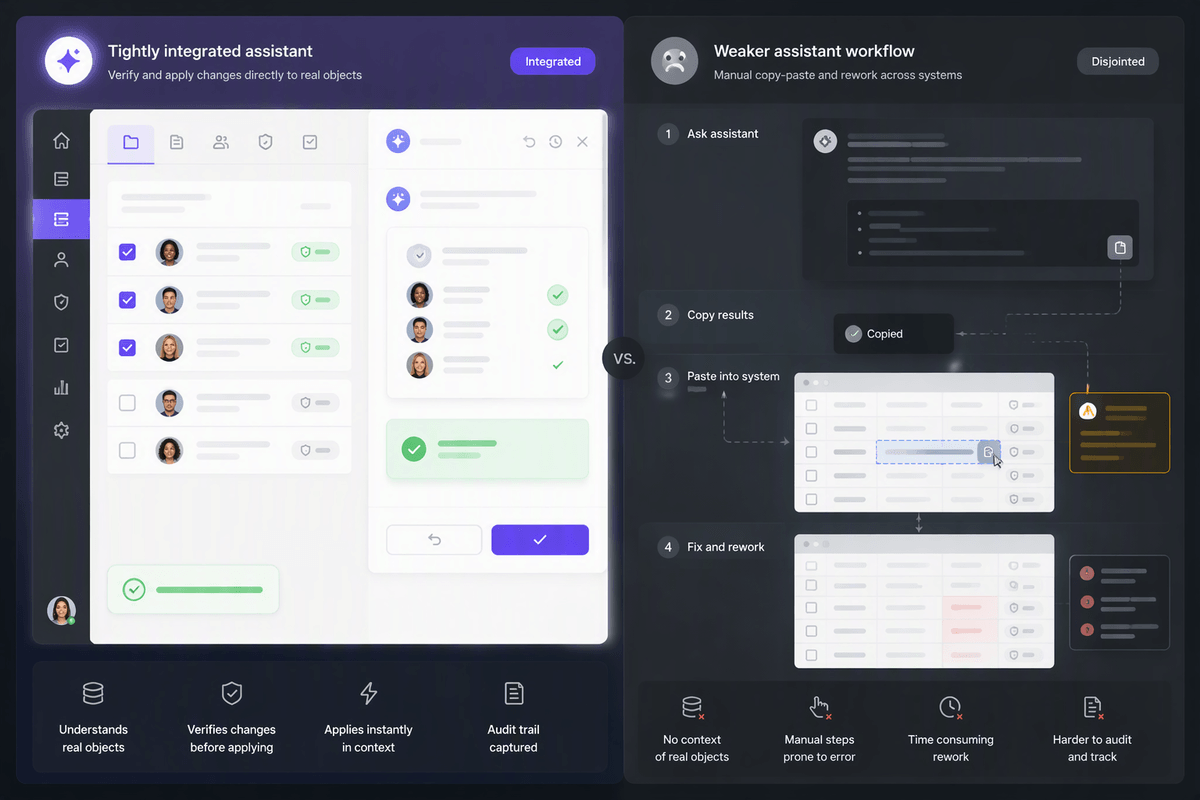
In practice, most of these assistants fall into a few patterns: drafting (emails, copy, slides), summarizing (threads, calls, long docs), extracting (key fields, action items), and transforming (rewrite in a new tone, turn notes into a plan, convert a request into a query). The useful versions are tightly connected to the app’s real objects—records, tasks, permissions—so the output can be checked and applied. The weak versions add an extra step: you prompt, then you still have to manually paste, verify, and redo work when it guesses wrong.
Why every software vendor is adding AI right now
You can feel the incentives pushing in the same direction. After ChatGPT proved that “type what you mean” can work, customers started expecting it everywhere, and competitors started marketing it as table stakes. If you sell software, adding an assistant is a fast way to signal relevance, raise price tiers, and reduce churn risk—even if the first version only drafts text and summarizes screens you already had.
There’s also a practical supply-side reason: vendors don’t need to invent a new breakthrough to ship “AI.” They can rent foundation models via APIs, wrap them in a UI, and aim them at the data already inside the product—tickets, docs, deals, messages. The easiest features to launch are often the least integrated, because deep integration means permissions, audit logs, and domain-specific guardrails. That work is slower, more expensive, and it exposes the vendor to support load when outputs are wrong but look confident.
When chat-first interfaces genuinely speed up work
You notice the chat layer earns its keep when the alternative is a lot of UI travel: hunting for the right screen, translating intent into filters, and stitching together outputs from multiple places. “Show me deals stuck in legal review this quarter and draft a status note for each owner” can be faster than building a report, exporting, and rewriting the same update repeatedly. The same is true when you’re starting from messy inputs: a call transcript becomes a set of action items, a long email thread becomes a decision log, a vague bug report becomes a structured ticket with steps to reproduce.
It also speeds work when you need a first pass, not a final answer. Drafts, rewrites, and quick comparisons reduce blank-page time, especially for routine communication. The constraint is that speed depends on tight grounding in the app’s real objects and permissions. If the assistant can’t cite where a number came from, link to the record it used, or apply the change with an undo trail, you’re back to copy-paste and manual checking.
Where the chat layer breaks: friction, ambiguity, and trust
The cracks start to show when chat is treated as a universal remote for tasks that depend on precise choices. “Update the pipeline for Q3” sounds straightforward until the assistant has to determine which fields are involved, what Q3 refers to, and whether existing values should be replaced or preserved in a separate view. Those dropdowns, filters, and confirmation dialogs that once seemed tedious served a purpose: they forced important details into the open. A chat interface removes much of that structure, leaving two options: answer a series of follow-up questions, which may take longer than using the original controls, or accept a guess that could change the wrong thing.
The same problem becomes more serious when there is no clear record behind an answer. A thread summary without links to the original messages, or a metric explained without its underlying report and timeframe, leaves people with little basis for checking the result. Confidence in the wording doesn’t solve that gap. Instead, someone has to go back, verify the inputs, reconcile discrepancies, and document what actually happened. That extra work becomes workflow debt, costing time and creating another opportunity for a seemingly minor assumption to turn into a real mistake.
The real price: data risk, errors, and workflow debt

You feel the real price when the assistant stops being a convenience and starts touching sensitive inputs. A “helpful” prompt often includes customer names, contract terms, incident details, or unreleased plans. If the feature routes requests through a third-party model, stores prompts for product improvement, or allows admins broad access to transcripts, you’ve created a new data pathway that doesn’t match your existing sharing model. Even when vendors offer “no training on your data,” teams still need to check retention windows, where data is processed, and what logs exist for audits.
Errors cost more than a bad draft because they can look like finished work. A summary that omits one exception can change a decision; a generated SQL query can be subtly wrong; an “updated” record can overwrite fields nobody meant to touch. The hidden expense is workflow debt: extra review steps, new conventions (“always ask it to cite sources”), and human backstops that weren’t needed before. Those checks are real labor, and they grow as the assistant gets used in higher-stakes flows rather than low-risk drafting.
A simple way to choose AI tools without chasing hype
You end up with a practical problem: ten tools now claim “AI,” but you only have time to learn and govern a few. A simple filter is to judge each feature on three questions: does it remove a repeated step you actually do every week, does it stay inside your existing permission model, and can you verify the output quickly. If it doesn’t save measurable time in a real workflow (not a demo), treat it like a nice-to-have drafting aid, not a process change.
Then run a small trial that forces the hard parts to show up. Pick one concrete job (weekly pipeline update, incident postmortem, support triage), define what “good” looks like, and require traceability: links to source records, citations to the messages it summarized, or a preview before it edits anything. Budget for the unglamorous costs—admin setup, access reviews, prompt guidelines, and a human review loop—because that’s where many “free” AI features become expensive.
Building an AI-augmented stack that stays manageable
Keeping an AI stack manageable starts with deciding where assistants are allowed to take action. Most tools are safer in read-only or draft mode, handling summaries, suggested edits, or proposed queries without changing anything directly. Write access belongs with a smaller set of tools that offer previews, approval steps, and reliable rollbacks. Identity and permissions also work better when managed centrally through SSO and groups rather than recreated inside every chat interface. Wherever an AI action affects a real object, the result should stay attached to that object, whether it is a ticket, document, or record with an audit trail.
Two simple habits help keep that system understandable: show sources through links, citations, or record IDs, and distinguish retrieved information from model inference. Neither requires much extra effort during normal use. The maintenance burden comes later, as vendor settings change, models behave differently, and new features appear without much warning. Retention rules, logging, transcript access, and related permissions therefore need a periodic review, with a quarterly check providing a reasonable baseline for catching changes before they become unnoticed gaps.